By Irshadkhan Pathan | Senior Biomedical Engineer and AI Consultant & Coach| impbiomed.com
“When I first built a hospital AI chatbot using Chatbase, I expected the technology to be the hardest part. It wasn’t. The hardest part was helping hospital staff trust it. This guide shares everything I learned — the technical steps, the human challenges, and the real-world lessons no YouTube tutorial will tell you.”
— Irshadkhan Pathan, Senior Biomedical Engineer with 20 years of hospital experience
Table of Contents
1. What Is a Hospital AI Chatbot — And Why Does It Matter in 2026?
A hospital AI chatbot is a software-powered virtual assistant that can hold intelligent, automated conversations with hospital staff, patients, or both — through a website, WhatsApp, a mobile app, or an internal dashboard.
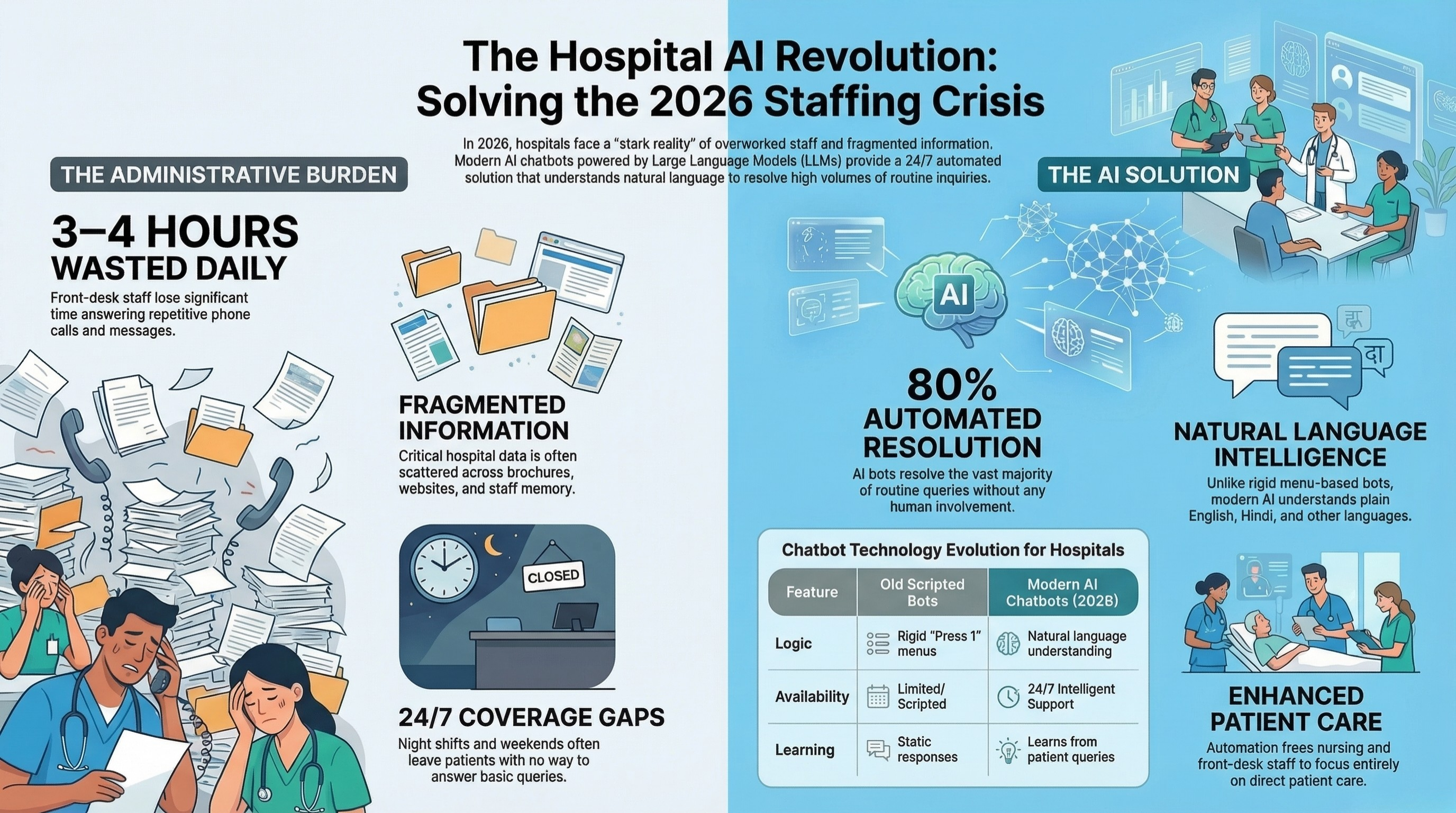
Unlike the old scripted bots that gave rigid, menu-based responses (“Press 1 for appointments, Press 2 for billing…”), modern AI chatbots powered by Large Language Models (LLMs) can understand natural human language. They can answer questions in plain English (or Hindi, or any language you configure), handle unexpected queries intelligently, and learn from the questions they receive.
In 2026, here is the stark reality facing Indian hospitals:
- Nursing stations receive the same 20 questions from patients and attendants every single day
- Front-desk staff spend 3–4 hours daily answering repetitive phone calls and WhatsApp messages
- Hospital information is scattered across printed brochures, websites, and the memory of individual staff members
- Night shifts and weekends leave patients with no one to answer basic queries
- Junior staff, especially in smaller hospitals, are under-trained and give inconsistent answers
An AI chatbot directly solves all five of these problems — at a fraction of the cost of hiring additional staff, and available 24 hours a day, 7 days a week.
According to industry data, hospitals that deployed AI chatbots for internal and patient-facing queries reported that the bots resolved up to 80% of routine queries without any human involvement. This frees your staff to focus on what matters: direct patient care.
2. Who Exactly Should Read This Guide?
This guide is written specifically for:
- Hospital administrators and medical directors who want to modernize their hospital operations without a massive IT budget
- Biomedical engineers and hospital IT staff who have been asked to “do something with AI” and don’t know where to start
- Clinic owners and private practitioners wanting to reduce the burden on their front desk
- Biomedical engineering students and fresh graduates building their practical AI skill set
- Healthcare consultants and digital health entrepreneurs who want to offer chatbot services to hospital clients
You do not need to know how to code. You do not need a large IT team. Everything in this guide can be implemented by a single motivated person with a laptop and a few hours of focused effort.
3. Real Problems an AI Chatbot Solves in a Hospital
Before I walk you through the “how,” let me walk you through the “why” — because understanding the actual pain points makes every step of the implementation more purposeful.
Here are the most common, high-frequency problems I personally observed during 19 years of working in hospital environments across India:
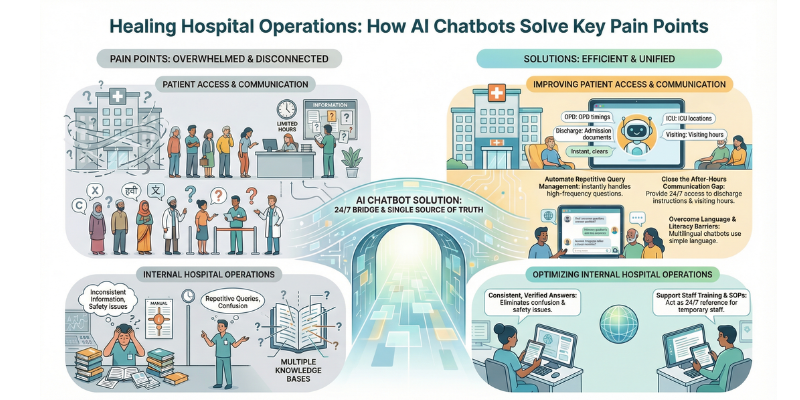
Problem 1: The Repetitive Query Overload At any given hospital, the nursing station and reception desk receive hundreds of queries every day. “What is the OPD timing?” “Which floor is the ICU on?” “Is Dr. Sharma available on Saturday?” “What documents do I need for admission?” These questions are important to patients — but they pull staff away from critical clinical tasks. A chatbot can answer every one of these instantly.
Problem 2: Inconsistent Information Delivery When a patient asks two different staff members the same question, they often get two different answers. This creates confusion, distrust, and sometimes patient safety issues. A chatbot, trained on a single accurate knowledge base, gives the same correct answer every time.
Problem 3: After-Hours Communication Gap Patients don’t get sick only between 9 AM and 5 PM. A patient at 11 PM worrying about their discharge instructions or a family member desperately trying to understand visiting hours has no one to call. A chatbot bridges this gap entirely.
Problem 4: Staff Training Gaps New staff members, locums, and temporary workers often lack knowledge of hospital-specific procedures. An internal-facing chatbot can act as a 24/7 smart reference guide — answering SOP questions, equipment handling queries, and escalation procedures for junior staff.
Problem 5: Language and Literacy Barriers In a diverse country like India, patients speak different languages and have varying levels of health literacy. A multilingual chatbot trained with simple, clear language can bridge this communication gap effectively.
4. What I Personally Built — My AI Chatbot Experience
I want to be completely transparent with you, because that is what separates this guide from the hundreds of generic “AI chatbot” articles floating around the internet.
I built a hospital AI chatbot using Chatbase.
I trained it on hospital-specific content including internal SOPs, staff FAQs, shift procedures, equipment handling guidelines, and escalation protocols — the kind of operational knowledge that lives in the heads of senior staff but is never written down clearly anywhere.
The chatbot was designed for hospital staff — not patients — with the goal of giving junior and new staff an always-available, intelligent reference tool. Instead of calling a senior colleague or searching through a dusty SOP binder, they could simply ask the chatbot.
What I learned from this experience:
- Building the chatbot technically took less than a week using Chatbase
- The biggest challenge was curating and organizing the knowledge base — the content that the chatbot is trained on
- The second biggest challenge was staff hesitation — not lack of technology, but lack of trust in AI
- Once staff saw it answer 5–6 questions correctly in a row, their skepticism melted quickly
- The chatbot consistently gave more accurate, more standardized answers than relying on verbal communication between staff members
This experience directly informs every step of the guide below. I’m not giving you textbook theory — I’m sharing what actually happened when I built this.

5. Tools You Need (No Coding Required) for AI chatbot
Here is the complete toolkit you need to build and deploy a hospital AI chatbot without writing a single line of code:
| Tool | Purpose | Cost |
|---|---|---|
| Chatbase | Build, train, and deploy your AI chatbot | Free tier / $40/month |
| Google Docs or Notion | Organize and write your knowledge base content | Free |
| Canva | Design a simple chatbot introduction graphic for staff | Free |
| Loom | Record a short training video for staff on how to use the chatbot | Free |
| WhatsApp Business API (optional) | Deploy chatbot on WhatsApp for patient communication | Pricing varies |
| WordPress + Chatbase Plugin (optional) | Embed chatbot on your hospital website | Free with Chatbase |
| Google Forms or Typeform | Collect staff feedback on chatbot performance | Free |
That’s it. No servers. No coding. No expensive IT consultants. Just these tools, used intelligently, in the right sequence.
6. Step-by-Step: How to Build and Deploy a Hospital AI Chatbot
Let’s now go through each step in detail.
Step 1 — Define the Purpose and Scope
This is the most important step. Do not skip it or rush it.
The biggest mistake people make when starting an AI chatbot project is jumping straight to the technology without clarity on what the chatbot is supposed to do. A chatbot with no defined scope becomes a chatbot that does everything poorly.
Before you open Chatbase or any other tool, answer these four questions clearly:
Question 1: Who is the primary user?
- Hospital staff (internal chatbot)?
- Patients and patient attendants (external chatbot)?
- Both?
I strongly recommend starting with an internal staff-facing chatbot. The reasons are:
- The risk is lower (staff are more forgiving of errors than patients)
- The knowledge base is easier to define (your SOPs and procedures)
- The success is easier to measure (staff query resolution rate)
- The wins are faster and more visible to hospital management
Question 2: What specific tasks will the chatbot handle?
Write down a list of 15–20 specific questions your chatbot should be able to answer. For a staff-facing hospital chatbot, these might include:
- “What is the protocol for bio-medical waste disposal in the ICU?”
- “How do I report a ventilator malfunction?”
- “What is the on-call schedule for biomedical engineers this week?”
- “What documents are required for equipment preventive maintenance?”
- “Who do I contact if an ECG machine is not working at 2 AM?”
For a patient-facing chatbot, the questions might be:
- “What are the OPD timings for the orthopaedics department?”
- “Is Dr. [Name] available on Sunday?”
- “Where is the blood bank located?”
- “What is the visiting hours policy for the ICU?”
- “How do I pay my hospital bill online?”
Question 3: What should the AI chatbot NEVER do?
This is your “guardrail definition” — and it is non-negotiable.
Your hospital AI chatbot should never:
- Diagnose symptoms or suggest a medical diagnosis
- Recommend medicines or dosage changes
- Give opinions on a patient’s treatment plan
- Access or share any patient-identifiable data (PHI)
- Replace a human for any urgent or emergency situation
Always programme in a clear escalation response: “This question requires a human expert. Please contact [Name/Extension/Department] for assistance.”
Question 4: Which department or function will you pilot first?
Don’t try to cover the entire hospital on Day 1. Pick one department — ideally your biomedical engineering department, ICU, or front desk — and make the chatbot excellent for that one area before expanding.
Step 2 — Choose the Right Chatbot Platform
For a beginner with no coding experience, Chatbase is my top recommendation. Here is why I chose it and continue to recommend it:
- Simple no-code interface: You can upload documents, paste text, or add URLs, and Chatbase builds the AI knowledge base automatically
- Powered by GPT-4: The underlying intelligence is OpenAI’s GPT-4, which means it understands context, handles follow-up questions well, and responds in a natural, conversational tone
- Multiple deployment options: Website embed, WhatsApp, API integration — all from one dashboard
- Customizable personality: You can set the chatbot’s name, persona, tone, and strict response boundaries
- Affordable: The free plan allows you to test before committing
Other platforms worth knowing:
| Platform | Best For | Technical Level |
|---|---|---|
| Chatbase | Beginners, quick deployment | Beginner |
| Tidio | Patient-facing website chat + live chat hybrid | Beginner |
| Botpress | More customisation, slightly more technical | Intermediate |
| ManyChat | WhatsApp-focused campaigns and reminders | Beginner |
| Flowise (Open Source) | Full control, self-hosted, privacy-sensitive deployments | Advanced |
For hospitals with strong data privacy requirements and no desire to use cloud platforms, Flowise running on a local server is worth exploring — though it requires more technical setup.
Step 3 — Prepare Your Knowledge Base
Your chatbot is only as good as the content you feed it. This is where most projects either succeed or fail — and it is where your real work happens.
A knowledge base is simply the collection of information your chatbot will use to answer questions. Think of it as the chatbot’s “brain” — everything it knows comes from what you give it here.
How to build your hospital knowledge base:
Source 1: Your existing documents Collect every document your hospital already has:
- SOPs (Standard Operating Procedures)
- Equipment manuals and quick-reference guides
- Staff handbooks and onboarding documents
- Department-wise FAQs
- Shift schedules and escalation contacts
- NABH accreditation documentation and checklists
- OPD timing charts and doctor availability schedules
Source 2: Interviews with senior staff Sit with your most experienced nurses, biomedical engineers, and front-desk staff. Ask them: “What are the 10 questions you get asked most often?” Write down every answer. This is gold that never makes it into official documents.
Source 3: Write new content for gaps After collecting existing documents and conducting interviews, you will find gaps — topics that staff know but that were never documented. Write simple, clear Q&A pairs for these topics. For example:
Q: What should I do if the ventilator alarm keeps triggering without a patient emergency? A: First, check the circuit connections and humidifier water level. If the alarm continues, check for a kinked inspiratory limb. If the issue persists, call the biomedical engineer on duty at extension 221 immediately. Do not silence the alarm without resolving the underlying cause.
Format your knowledge base for best results:
- Use clear, simple language — avoid excessive medical jargon in patient-facing content
- Break content into short, specific Q&A pairs rather than long paragraphs
- Organise by department or topic
- Save as a Google Doc, PDF, or plain text file — Chatbase accepts all of these
Pro tip from my experience: Create a “Master FAQ document” in Google Docs that you update whenever you discover a new question the chatbot couldn’t answer. This becomes your ongoing content management system.
Step 4 — Build and Train the Chatbot
Now comes the part most people are afraid of — but it is actually the easiest step if you have completed Steps 1 to 3 properly.
Setting up your chatbot on Chatbase:
- Go to chatbase.co and create a free account
- Click “New Chatbot”
- Upload your knowledge base documents (PDFs, Google Docs, or paste text directly)
- Give your chatbot a name — something professional like “HospitalAssist” or your hospital’s name + “Bot”
- Write a clear system prompt — this is the set of instructions that defines your chatbot’s personality and guardrails
Here is the exact system prompt I recommend for a hospital staff-facing chatbot:
“You are HospitalAssist, an internal AI assistant for [Hospital Name]. Your role is to help hospital staff — including nurses, biomedical engineers, administrative staff, and junior doctors — quickly find accurate information about hospital procedures, equipment protocols, department contacts, and operational guidelines.
You must always:
- Answer based only on the information provided in the hospital knowledge base
- Be professional, clear, and concise in your responses
- Refer staff to the appropriate senior person or department if a question is outside your knowledge
- Escalate any emergency situation immediately with the message: “This is an emergency situation. Please contact [Emergency Contact] immediately.”
You must never:
- Diagnose symptoms or give medical advice
- Share or reference any patient-identifiable information
- Speculate or guess about information not in your knowledge base
- Replace emergency response protocols
If you are unsure of an answer, say: “I don’t have specific information on this. Please contact [Department Head / Supervisor] for clarification.”“
- Customise the appearance — set your hospital’s colours and logo if deploying on a website
- Set the language (English, Hindi, or both if your hospital is multilingual)
- Click “Train” and let Chatbase process your knowledge base — this usually takes 5–15 minutes
Testing during training: As soon as training completes, immediately start asking the chatbot the 15–20 questions you defined in Step 1. Check the accuracy of every answer. Note which questions it gets wrong or partially wrong — these need improvements in your knowledge base.
Step 5 — Test Rigorously Before Deployment Your AI Chatbot
Never skip this step. In a hospital environment, an AI chatbot that gives wrong information can cause real harm — operational confusion, missed escalations, or misunderstood procedures.
Your testing checklist:
☐ Ask every question from your Step 1 list — check accuracy of each answer
☐ Ask the same question in 3–4 different ways (as different staff members would phrase it) — check consistency
☐ Ask questions outside the chatbot’s scope — verify it declines gracefully and escalates
☐ Ask an emergency scenario — verify it immediately directs to emergency contacts
☐ Ask a question with a spelling mistake or grammatical error — verify the chatbot still understands
☐ Ask a question in Hindi or a local language if your staff uses it — verify comprehension
☐ Try to “trick” the chatbot — ask it to give medical advice, verify it refuses
☐ Test the chatbot with 5 actual staff members from the target department — observe them using it naturally and note where they get confused
☐ Time the response — it should reply within 3–5 seconds for any question
What to do when the chatbot fails a test:
- If it gives a wrong answer → add the correct answer to your knowledge base in a clearer Q&A format
- If it misunderstands a question phrasing → add that phrasing variation to your knowledge base
- If it goes off-topic → tighten your system prompt with additional restrictions
- If it is too verbose → add to your system prompt: “Keep all answers concise — under 100 words unless more detail is essential”
Run through the complete checklist at least twice before considering deployment ready.
Step 6 — Deploy and Integrate into the Hospital
Deployment is not just a technical task — it is equally a human change management task. And in my experience, the human side is always harder.
Technical deployment options:
Option A — Website Embed (Recommended for starting) Chatbase gives you a simple embed code (a few lines of JavaScript). Paste this into your hospital website and a chat widget appears in the bottom corner of every page. If your website runs on WordPress, Chatbase has a direct plugin that makes this even easier.
Option B — WhatsApp Integration For hospitals where staff primarily communicate via WhatsApp, this is powerful. Chatbase integrates with WhatsApp Business API. Staff can message the chatbot directly on WhatsApp as if texting a colleague. Setup requires a WhatsApp Business account.
Option C — Shared Link (Fastest to deploy) Chatbase generates a shareable URL for your chatbot. Simply share this link with your department staff via WhatsApp group or email. No embedding required. Perfect for a pilot deployment.
I recommend starting with Option C for your very first pilot — it is the fastest way to get real staff using the chatbot and generating real feedback.
The Human Side of Deployment — Managing Staff Resistance:
From my personal experience, here is the most honest advice I can give you:
Staff resistance is real and valid. People who have worked in hospitals for years have seen many “new systems” come and go. They are skeptical by default. Respect that skepticism.
Here is what worked for me:
1. Do a 10-minute live demonstration. Gather 5–8 staff members. Ask the chatbot questions in front of them — questions they actually care about. Let them watch it answer correctly and instantly. This does more than any email announcement.
2. Let them ask it questions themselves. After the demonstration, hand them your phone or laptop and say “ask it anything.” The first time a nurse sees the chatbot correctly answer a question she has been asking senior staff for years, the skepticism starts to melt.
3. Position it as their assistant, not their replacement. The message must be: “This is here to help you, not replace you. It handles the repetitive queries so you have more time for what matters.” This framing matters enormously.
4. Keep a human available alongside the chatbot. For the first 2–4 weeks, always have someone available to answer questions the chatbot cannot. This builds staff confidence that they won’t be “stuck with a bot.”
5. Acknowledge failures openly. When the chatbot gets something wrong (it will), acknowledge it, fix the knowledge base, and let staff know you updated it based on their feedback. This builds trust in the system.
Step 7 — Monitor, Improve, and Scale AI Chatbot
Your chatbot is not a “set it and forget it” tool — it is a living system that improves over time if you invest in it.
Key metrics to monitor every week:
| Metric | What It Tells You | Target |
|---|---|---|
| Total queries handled | Volume of chatbot usage | Growing week-on-week |
| Resolution rate | % of queries resolved without human help | >70% within 1 month |
| Escalation rate | % of queries passed to human | <30% within 1 month |
| Unanswered questions | Topics not in your knowledge base | Fix these weekly |
| Average response time | Speed of replies | Under 5 seconds |
| Staff satisfaction rating | Qualitative feedback from users | Track via monthly survey |
Chatbase provides a dashboard where you can see all conversations the chatbot has had. Review these every week — especially the questions it failed to answer. Each failure is a data point telling you exactly what to add to your knowledge base.
How to scale after a successful pilot:
Once your pilot department is showing a >70% resolution rate and staff are using the chatbot regularly, it is time to expand:
- Add more departments’ content to the knowledge base
- Create department-specific chatbots if the hospital is large (one for biomedical, one for nursing, one for administration)
- Consider a patient-facing version on the hospital website, using a stripped-down, carefully guardrailed version of the staff chatbot
- Present the success data to hospital management — quantify the hours saved per week, the reduction in repetitive queries, the staff satisfaction improvement. This is the business case for expanding the project.
7. Data Privacy and Compliance in India: What You Must Know
Privacy compliance in India is governed by the Digital Personal Data Protection Act (DPDP Act) 2023, which came into force and places significant responsibilities on any organisation handling personal data — including hospitals.
Key compliance principles for your hospital AI chatbot:
Principle 1 — Do Not Store Patient Data in the Chatbot Your chatbot’s knowledge base should contain only operational and procedural information — not patient records, not patient names, not medical histories. Never upload patient-identifiable information into Chatbase or any cloud-based chatbot platform.
Principle 2 — Be Transparent with Users Any staff member or patient interacting with the chatbot should know they are talking to an AI, not a human. Add a clear disclaimer at the start of every conversation: “Hi! I am HospitalAssist, an AI tool for [Hospital Name]. I can answer questions about hospital operations and procedures. For medical advice, please consult your doctor.”
Principle 3 — Use a Privacy-Compliant Platform Chatbase’s enterprise plans offer data processing agreements. For large hospitals or NABH-accredited facilities, review the data processing terms carefully with your legal or compliance team.
Principle 4 — Local Server Option for Sensitive Hospitals If your hospital is concerned about sending data to a cloud server in another country, consider running an open-source chatbot like Flowise or Ollama on your hospital’s local server. This keeps all data on-premises.
NABH Considerations: If your hospital is NABH accredited, your chatbot’s knowledge base is a natural extension of your SOP documentation. Treating it as a “digital SOP assistant” positions it well within your existing quality framework. Ensure the information in the chatbot aligns exactly with your current NABH-approved SOPs.
8. Common Mistakes to Avoid
Based on my hands-on experience and interactions with healthcare professionals, here are the most damaging mistakes — and how to avoid each one:
Mistake 1: Launching Without Adequate Testing The temptation to show results quickly is understandable. But a chatbot that gives wrong answers in a hospital environment destroys trust instantly — and rebuilding that trust takes far longer than the testing would have. Minimum testing period: 2 weeks before any staff-facing launch.
Mistake 2: Overloading the Knowledge Base With Unstructured Documents Uploading an entire 200-page hospital manual as a single PDF and expecting the chatbot to understand it perfectly is a recipe for failure. Break your content into clean, specific Q&A pairs. Structure is everything.
Mistake 3: Building a Patient-Facing Medical Advice Bot This is both medically dangerous and legally risky. I cannot state this strongly enough: your chatbot must never attempt to diagnose, prescribe, or advise on clinical matters. Start with staff-facing operational content only.
Mistake 4: No Clear Escalation Path Every question the chatbot cannot answer must end with a specific, actionable escalation instruction — a name, an extension number, a department. “I don’t know” is never an acceptable final answer in a hospital setting.
Mistake 5: Ignoring Staff Feedback in the First Month The first 4 weeks of deployment generate the most valuable feedback you will ever receive. Be present. Collect feedback actively. Update the knowledge base weekly based on what you learn. The hospitals I’ve seen fail with chatbots all share one common trait — they launched and disappeared.
Mistake 6: Not Documenting the Chatbot’s Value Track every metric from Day 1 (see Step 7). Without data showing what the chatbot has achieved, you cannot make the case for expanding it, getting more budget for it, or using it as a portfolio piece for future clients.
9. Cost Breakdown: What Will It Actually Cost in India?
Here is a realistic cost breakdown for building and deploying a hospital AI chatbot in India, using no-code tools:
| Item | Cost (INR) | Notes |
|---|---|---|
| Chatbase Hobby Plan | ₹0–₹3,600/month | Free plan handles small pilot; paid plan for scale |
| Knowledge Base Development | ₹0 (your time) | ~20–40 hours of content curation and writing |
| Staff Training Session | ₹0 | Done in-house |
| Custom Domain/Website Embed | ₹0 | If hospital website already exists |
| Total Monthly (Basic) | ₹3,600–₹14,000/month | For a fully functional staff-facing chatbot |
| If you hire a consultant to build it | ₹25,000–₹75,000 | One-time setup fee |
The honest truth: A motivated biomedical engineer or hospital IT staff member can build a functional pilot chatbot in a single weekend using Chatbase’s free plan and a well-prepared Google Doc knowledge base. The cost of the technology is minimal. The investment is your time and attention.
10. ROI: What Your Hospital Gains From a Chatbot
Here is how to quantify the return on investment for hospital management approval:
Calculate Staff Time Saved: If your nursing station and front desk together handle 100 repetitive queries per day, and each takes 3 minutes to answer → that is 300 minutes (5 hours) of staff time per day.
If the chatbot resolves 70% of those queries → it saves 3.5 hours of staff time per day.
At ₹200/hour for a staff member → that is ₹700/day → ₹21,000/month in recovered productive time.
For a chatbot costing ₹1,600/month → the ROI is 13x in the very first month.
Additional gains that are harder to quantify but very real:
- Reduction in information errors and miscommunications between departments
- 24/7 availability removing after-hours communication gaps
- Improved onboarding experience for new staff joining the hospital
- Consistent, standardised answers replacing the “ask 3 people, get 3 answers” problem
- A tangible demonstration to NABH auditors that the hospital has structured SOP distribution
11. Frequently Asked Questions
Q: Can a small hospital or single-doctor clinic use this?
Absolutely. In fact, smaller hospitals benefit the most because they typically have limited staff handling a disproportionately high volume of repetitive queries. A single-clinic chatbot can be set up in a weekend with Chatbase’s free plan.
Q: Do I need a hospital IT department to do this?
No. This entire guide is designed to be executed by a single person with no coding experience. If you can use Google Docs and WhatsApp, you have all the technical skills needed to build a basic chatbot.
Q: Will the chatbot speak Hindi?
Yes. Chatbase (powered by GPT-4) supports Hindi and many other Indian languages. You can train it with Hindi-language content and it will respond in Hindi. For multilingual hospitals, you can train it with both English and Hindi content.
Q: Is it safe to put hospital information into a cloud chatbot platform?
As long as you only put operational and procedural information (not patient data), it is safe. However, for hospitals with strict data governance policies, consider using a locally hosted open-source chatbot like Flowise.
Q: How long does it take to build and deploy the first version?
With a well-prepared knowledge base, a functional pilot can be ready in 3–5 days. A fully tested and deployed staff-facing chatbot typically takes 2–4 weeks when done properly.
Q: What happens when the chatbot gives a wrong answer?
This will happen — especially in the first few weeks. The key is to have a clear feedback mechanism so staff can report errors. Review all conversations weekly, identify failures, and update the knowledge base accordingly. Each wrong answer is data telling you exactly how to improve.
Q: Can this chatbot connect to the hospital’s EMR or HIS?
Basic chatbots like those built on Chatbase do not connect to EMR systems — and for patient data privacy reasons, this is actually appropriate for a first deployment. Advanced integration with hospital information systems is a next-level capability that requires custom API development and is best approached after your basic chatbot has proven its value.
12. Final Thoughts: My Honest Advice
I want to close this guide the same way I opened it — with honesty from real experience.
The technology for building a hospital AI chatbot has never been more accessible. Three years ago, doing what I did with Chatbase would have required a software development team and a significant budget. Today, a single biomedical engineer with the right knowledge and the right tools can build a working prototype in a weekend.
But the technology is not the hard part.
The hard part is earning trust. Trust from hospital administrators who have been burned by expensive IT projects that delivered nothing. Trust from nursing staff who fear they’ll be replaced by a machine. Trust from patients who need to feel their information is safe.
Earn that trust by starting small. Start with one department. Start with the most skeptical senior nurse in that department and get her to admit, even grudgingly, that “it answered that correctly.” Build from there.
I built my hospital chatbot one question at a time, one conversation at a time, one convinced skeptic at a time. And I can tell you from the other side of that journey: the day a staff member uses the chatbot instinctively — without being reminded, without being shown — is the day you know the project has succeeded.
Your next step right now: Open Chatbase, create a free account, write down 20 questions your hospital staff get asked every single day, and build your first chatbot. Don’t wait until everything is perfect. Build, test, learn, improve.
The hospitals that lead in the next decade will be the ones that started learning today.
About the Author: Irshadkhan Pathan is a Senior Biomedical Engineer with 20 years of hands-on experience in hospitals across India. He is also an AI consultant, WordPress developer, and educator who helps hospitals and healthcare businesses adopt AI and digital tools without needing a large IT budget. He has personally built AI Tools and trained AI chatbots for hospital environments using Chatbase and consults with healthcare organizations on NABH documentation, biomedical equipment management, and AI-driven workflow automation.
📧 Contact: impbiomed.com/contact-us 🌐 Services: impbiomed.com 📝 Blog: medtechinsighter.com
Did this guide help you? Drop a comment below or share it with a colleague in hospital management or biomedical engineering. If you want hands-on help building your hospital’s AI chatbot, I offer consultation and implementation services — reach out through impbiomed.com.